

ARRAYS are the simplest possible type of collection. They are structures that store a series of elements of the same type and whose number of elements is fixed.
We can think of an ARRAY as an ordered sequence of boxes, where each box contains a specific value.
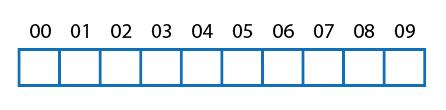
Each element in an ARRAY has a unique position called an index, which is used to directly access that element. For example, this is how we would access element 06.
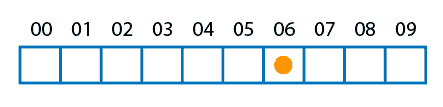
This means we can quickly access any element in the array without needing to go through all the previous elements.
ARRAYS are very efficient collections in terms of space usage and offer fast access to elements.
When to use an array
The main use of ARRAYS is to handle a fixed number of elements. It is mainly suitable for transferring and storing data between parts of a program.
For example, imagine a function getStudents() that returns a collection with the students of a course. The students are who they are, let’s say 27.
I don’t want you to add or remove students, because that’s who they are. So I return a fixed-length ARRAY. Then, you can do whatever you want with it.
On the contrary, to work with a collection, it is normal to use a Dynamic Array, which is an “enhanced” and much more versatile version. But for exchanging collections, it’s better to use an array.
Properties of arrays
| Property | List |
|---|---|
| How often you will use it | 🔺🔺 |
| Is mutable | ❌ |
| Is ordered | ✔️ |
| Is indexable | ✔️ |
| Allows duplicates | ✔️ |
Examples of arrays in different languages
An array has a fixed size, so it is not possible to perform many actions. Basically, with an array we can:
- Create them
- Read an element at a position
- Modify an element at a position
- Get the length
Create an array
The syntax for declaring an array varies depending on the programming language we are using. Let’s see examples in some popular languages.
int[] numbers = new int[5];
int numbers[5];
let numbers = [1, 2, 3, 4, 5];
names = [1, 2, 3, 4, 5]
In the previous examples, in the case of C# and C++, we have created arrays that can store a maximum of 5 elements.
However, not all languages have fixed-size arrays. For example, in the case of JavaScript and Python, these arrays will be dynamic in size.
Access and manipulation of elements
Once we have declared an array, we can access and manipulate its elements using indices.
In most programming languages, indices start at 0. This means that:
- The first element has an index of
0 - The second has an index of
1 - And so on…
To access one of the elements, the [] operator is generally used. Let’s see some examples.
int firstElement = numbers[0]; // Accesses the first element
int thirdElement = numbers[2]; // Accesses the third element
auto firstElement = numbers[0]; // Accesses the first element
auto thirdElement = numbers[2]; // Accesses the third element
let firstElement = numbers[0]; // Accesses the first element
let thirdElement = numbers[2]; // Accesses the third element
firstElement = numbers[0]; 'Accesses the first element
thirdElement = numbers[2]; 'Accesses the third element
At first, it will be hard to get used to accessing elements starting at 0. Don’t worry, you’ll quickly get the “hang of it”.
Modifying array elements
numbers[0] = 10; // Modifies the first element of the array
numbers[2] = 20; // Modifies the third element of the array
numbers[0] = 10; // Modifies the first element of the array
numbers[2] = 20; // Modifies the third element of the array
numbers[0] = 10; // Modifies the first element of the array
numbers[2] = 20; // Modifies the third element of the array
numbers[0] = 10; 'Modifies the first element of the array
numbers[2] = 20; 'Modifies the third element of the array
Length of an array
In many cases, we need to know the number of elements an array contains. To get the length, we can use the corresponding function or property according to the programming language:
var length = numbers.Length;
Arrays in C++ do not have a “length” property. I hope you remember the number you put when you created it 😊!
const int ARRAY_SIZE = 5;
int numbers[ARRAY_SIZE];
let length = numbers.length;
length = len(names)
Efficiency of arrays intermediate
An ARRAY is a data structure that stores elements contiguously in memory. Reading an element in an array is very efficient, as it can be accessed directly through its index in constant time O(1).
Insertion and deletion of elements do not exist as operations because an array has a fixed size.
On the other hand, searching requires traversing all elements in the worst case, which also has a linear time complexity O(n).
| Operation | Array |
|---|---|
| Sequential access | 🟢 |
| Random access | 🟢 |
| Add at beginning | ⚫ |
| Remove at beginning | ⚫ |
| Add at end | 🟢 |
| Remove at end | 🟢 |
| Random insertion | ⚫ |
| Random deletion | ⚫ |
| Search | 🔴 |
If you want to know more, check out this entry.
Internal workings Advanced
When working with an ARRAY, the elements are generally reserved in a contiguous area of memory.
When creating the new array (which can happen at compile time or runtime) the compiler or interpreter reserves the necessary memory.
We know that the size of an array is fixed. On the other hand, the memory size needed to store each element is known by its type. So the interpreter, or the compiler, knows how much memory is needed.
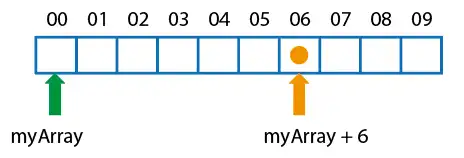
From there, the “name” of the array is an alias to the header, or first element of the array.
When we access element 6, for example, the computer simply has to go to the memory, where the first element is, and move 6 positions. For this, it logically takes into account the size of the stored element.
These operations are very simple, and computers are highly optimized to perform them. That’s why arrays are so efficient.
