

Vite is a frontend development tool that has quickly gained developers’ attention for its speed and ease of use.
Created by Evan You, the same developer behind Vue.js, Vite is designed to provide an ultra-fast development environment and a suitable build experience for modern web projects.
Advantages of Vite,
- Fast Server Start: Vite uses native ES modules in the browser, allowing a development server to start almost instantly, regardless of the project size.
- Efficient Hot Module Replacement (HMR): Vite’s hot reload is extremely fast, as it only replaces the modules that have changed without reloading the entire page.
- Optimized Build: Vite uses Rollup for production builds, providing a complete set of optimizations and flexible configuration.
- TypeScript Support: Vite handles TypeScript efficiently, both in the development environment and in production builds.
- Plugins and Extensibility: Being based on Rollup’s architecture, Vite supports a wide range of plugins and is highly extensible.
Installation and Initial Setup
To start using Vite, you need Nodejs and NPM (Node Package Manager). If you don’t know what they are, or want to learn more, I leave you these two little courses here 👇.
Learn to develop with Node.js step by step
Learn how to use the NPM package manager
Create a new project with Vite
The easiest way to start a new project with Vite is by using the project creation tool it provides. Open a terminal and run the following command:
npm create vite@latest
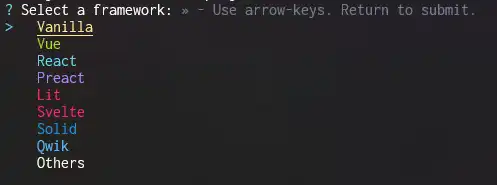
This will start a wizard that will guide you through the project setup process. It will ask you to select the project name and the framework you want to use (e.g., Vanilla, Vue, React, Svelte, etc.).
Run the development server
To start the development server, use the following command:
npm run dev
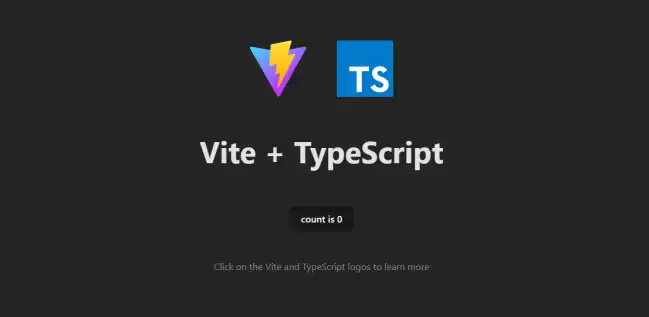
This command starts a development server and opens your application in the browser, usually at http://localhost:5173.
Project Structure
The basic structure of a Vite project is as follows:
📂 project-name/ ├── 📄 index.html ├── 📄 package.json ├── 📂 public/ ├── 📂 src/ │ ├── 📂 assets/ │ ├── 📂 components/ │ └── 📄 main.js └── 📄 vite.config.js
| File/Directory | Description |
|---|---|
| package.json | npm configuration file |
| vite.config.js | Vite configuration file |
| index.html | The main HTML file of the application |
| src/ | This is where we put our code |
| public/ | Contains static files that don’t need special processing |
First Vite File
In src/main.js, you can import and use ES modules as follows:
import './style.css';
import javascriptLogo from './javascript.svg';
import { setupCounter } from './counter.js';

document.querySelector('#app').innerHTML = `
  <div>
    <a href="https://vitejs.dev" target="_blank">
      <img src="/vite.svg" class="logo" alt="Vite logo" />
    </a>
    <a href="https://developer.mozilla.org/en-US/docs/Web/JavaScript" target="_blank">
      <img src="${javascriptLogo}" class="logo vanilla" alt="JavaScript logo" />
    </a>
    <h1>Hello Vite!</h1>
    <div class="card">
      <button id="counter" type="button"></button>
    </div>
    <p class="read-the-docs">
      Click on the Vite logo to learn more
    </p>
  </div>
`;

setupCounter(document.querySelector('#counter'));
In this example, a CSS file, an SVG logo, and a JavaScript module to set up a counter are imported.
Advanced Features
Configuration
The vite.config.js file allows for detailed configuration of Vite. You can customize the development server behavior, the build, and add plugins as follows:
import { defineConfig } from 'vite';

export default defineConfig({
  server: {
    port: 3000,
  },
  build: {
    outDir: 'dist',
  },
  plugins: [],
});
Plugins
Vite has a robust plugin ecosystem that can be used to extend its functionality. Here is an example of how to add a plugin for Vue:
import { defineConfig } from 'vite';
import vue from '@vitejs/plugin-vue';

export default defineConfig({
  plugins: [vue()],
});
TypeScript Integration
Vite natively supports TypeScript. To use TypeScript, simply rename your files from .js to .ts and make sure you have typescript installed in your project:
You can also add a tsconfig.json file at the root of your project to configure the TypeScript compiler.
CSS and Preprocessors
Vite supports CSS and preprocessors like Sass, Less, and Stylus. Here is an example of how to set up Sass:
npm install sass
Then, in your style files, you can use Sass syntax:
/* src/style.scss */
$color: purple;

body {
  color: $color;
}
In your main.js file:
import './style.scss';
