

If you are here, it’s probably because at some point you’ve looked at an electronic device and wondered: “How does this work?” or, even better, “Could I build something like this?”.
The short answer is: yes, you can.
Arduino is a great way to start the journey to achieve that. It is an excellent platform for practice and learning, both in programming and electronics.
It will also bring you hours and hours of fun working on your robotics and electronics projects (which is always great 😊).
In this first article of the course, we are going to lay the foundations. We are not going to connect wires or write lines of code yet… but we are going to see what we are dealing with.
What exactly is Arduino?
Many people think Arduino is “a little blue board with components”. And well, in a way that’s true… but the correct definition is broader.
Arduino is an open-source electronics platform based on easy-to-use hardware and software.
Notice we said “platform”, not just “board”. This is because Arduino consists of two parts that need to work together:
- The Hardware (The board): The physical component, the printed circuit board you can touch, where we will connect lights, motors, and sensors.
- The Software (The IDE, libraries, firmware): It’s all the software that allows us to write the instructions we want the board to execute.
Here comes a good part of Arduino. It makes you learn electronics and programming at the same time, while having fun.
A Microcontroller
If you look at an Arduino board, you’ll see a black, elongated chip (or a small square one, depending on the version) with many pins.
That chip is the Microcontroller. It is the brain of Arduino.
A microcontroller is basically a small computer contained in a single chip. Unlike your PC or smartphone, this one is much (much!) less powerful.
But, in return, the Microcontroller has inputs to receive information from the environment (sensors) and outputs to perform actions (actuators, motors…), according to a program we load from a computer, which it can execute autonomously.
Inputs: The microcontroller “reads” the world. Has a button been pressed? Is it hot? Is there a lot of light?
Processing: According to the instructions we have given it (our code), it decides what to do. “If it’s hot, then…”
Outputs: It executes an action on the physical world. Turns on a fan, moves a motor, or lights up an LED.
To get started with Arduino, logically, the first thing is to buy one. That’s why we are going to look at the different available models.
Which Arduino model should I buy?
Although there are dozens of official boards and variants, to get started don’t complicate things. The choice boils down to three “classics” that cover 99% of beginner needs:
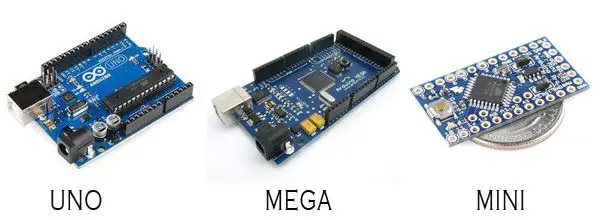
| Model | I/O digital | Analog Inputs | PWM Outputs | UART | Memory | Price |
|---|---|---|---|---|---|---|
| Uno r3 | 16 | 6 | 6 | 1 | 32kb | 7.5€ |
| Nano v3 | 14 | 8 | 6 | 1 | 32kb | 3.5€ |
| Mega r3 | 54 | 16 | 14 | 4 | 256kb | 12.5€ |
| Mini 05 | 14 | 6 | 8 | 1 | 32kb | 2.5€ |
- Arduino UNO: It is the standard. It has the perfect size to handle with your hands, it’s robust, and compatible with most accessories (Shields).
- Arduino Nano: Basically, it’s a “shrunken” Arduino UNO. It has the same power, but a tiny size ideal for plugging directly into a breadboard.
- Arduino MEGA: The beast. It’s bigger, has more memory, and many more inputs and outputs. It’s used in large projects like 3D printers or complex robots.
To get started, buy an Arduino UNO (R3 or R4). It’s the most documented board in the world, the easiest to connect, and the one that will work without problems.
- Leave the Nano for when you want to make small final assemblies.
- The Mega only if your project runs out of pins (which will take a while to happen).
It’s a good debate. Arduino is flexible and reliable. So, why did we say for domestic projects? Why not in commercial or industrial applications?
The short answer is that in a factory, certifications and guarantees are sought. If you have to control a very expensive machine, you need industrial equipment that ensures it withstands electrical noise (and kicks), and that has technical support behind it if something fails.
But that doesn’t mean learning Arduino is just playing. Everything you learn here about electronics, automation, programming, and telecommunications, you can apply directly if you ever have to use a more expensive industrial controller.
