

Visual Studio Code, commonly known as VS Code, is a source code editor developed by Microsoft.
VS Code is halfway between a text editor and a traditional IDE. It is a lightweight program, but it incorporates certain features common in IDEs like autocompletion, error highlighting, or debugging.
Visual Studio Code has gained great popularity in the software development community, and has become one of the almost indispensable tools in the programming field.
There are several reasons behind VS’s success. It is fast, easy to use, very flexible and customizable, and supports a wide range of extensions and customizations.
Furthermore, it offers support for a large number of file formats, such as HTML, CSS, JavaScript, Python, C++, C#, Markdown, Json, among many others.
Although the name can be confusing, VS Code should not be confused with Visual Studio, which is a more complete integrated development environment (IDE) oriented towards large-scale applications.
How to Install Visual Studio Code
Visual Studio Code is a cross-platform tool, which means you can install it on Windows, macOS, and Linux.
To install it, we need to go to the official Visual Studio Code website at https://code.visualstudio.com/ and download the appropriate version for our computer.
Once the appropriate version is downloaded, we just have to run the installer. The usual installation wizard will appear. We follow the instructions, accept the license terms, and “next, next, next” (it’s no more complicated than that).
Once the installation is complete, we can start Visual Studio Code from the start menu or desktop.
Main Features of Visual Studio Code
Intuitive and Customizable Interface
Visual Studio Code offers an intuitive and easy-to-use user interface. It is simple and comfortable. Its minimalist approach allows for a clean, distraction-free development experience.
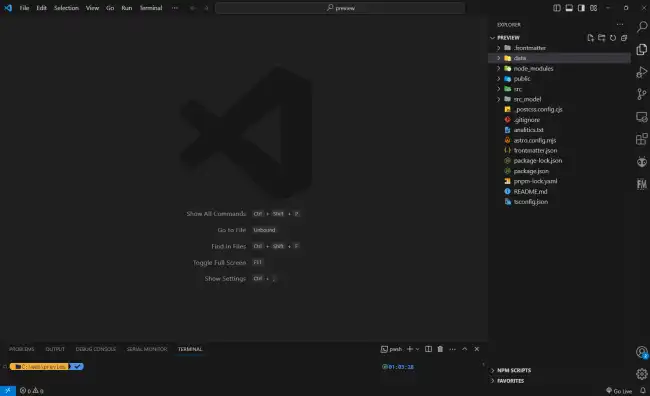
Furthermore, the interface is highly customizable. You can add or remove panels, change themes and colors, and adjust it according to your preferences.
Support for Multiple Programming Languages
VS Code is compatible with a wide range of file formats, including HTML, CSS, JavaScript, Python, C#, Java, or TypeScript. VS Code provides tools and extensions to facilitate development in multiple languages.
Code Editing Features
VS Code provides a complete set of code editing tools, including syntax highlighting, intelligent autocompletion, code suggestions, automatic indentation, multi-line selection, and advanced search and replace.
Integrated Debugging
VS Code provides debugging functions that make it easier to detect and correct errors in your code. It allows you to set breakpoints, inspect variables, and execute code step by step to better understand the execution flow and troubleshoot issues.
Extensions and Customizations
One of the most notable features of Visual Studio Code is the ability to extend its functions through the installation of extensions. There is a wide range of extensions created by the developer community that extend the editor’s functionalities and adapt it to different needs.
Integration with Version Control
Visual Studio Code integrates with version control systems like Git, which simplifies managing changes in your projects. You can perform commits, merges, branching, and other version control operations directly from the editor.
