
Today we are going to look at WinSCP, an SFTP program for Windows users that is very useful for transferring and managing files to a remote Linux system like Raspbian on a Raspberry Pi.
From a Linux system, it is common to transfer and manage files via the command line. In contrast, using the terminal is not as common in Windows. However, this doesn’t mean we can’t do it. On the contrary, we can do it comfortably thanks to WinSCP.
WinSCP (Windows Secure Copy) is an Open Source graphical client for Windows that allows file transfer and manipulation with a remote server.
It supports the SFTP (SSH File Transfer Protocol), SCP (Secure Copy Protocol), FTP (File Transfer Protocol), and FTPS (File Transfer Protocol SSL) protocols. SFTP is a standard part of the SSH-2 package. SCP is a standard part of the SSH-1 package.
It is very easy to use. Its graphical interface features a dual-panel layout, where we can upload files simply by dragging and dropping from the source (left panel) to the right panel.
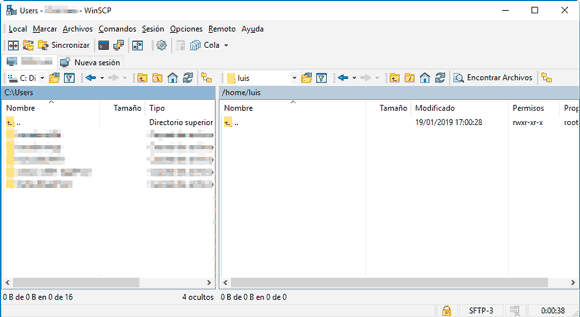
Additionally, WinSCP has a connection list where we can optionally and securely store the connections we use regularly. This makes connecting to one of our remote machines very easy.
Besides transferring files (downloading and uploading), we have the usual operations on files and directories, such as creating, renaming, modifying properties, creating symbolic links and shortcuts, among others.
On the other hand, one of WinSCP’s strong points is its automation capability through ‘batch’ operations and scripting. It is also possible to open a command-line interface directly from the application itself.
If we need to log in as a sudoer, we can configure it in Edit > Advanced… > Environment > SFTP, with sudo su -c /usr/lib/sftp-server in the “SFTP Server” field.
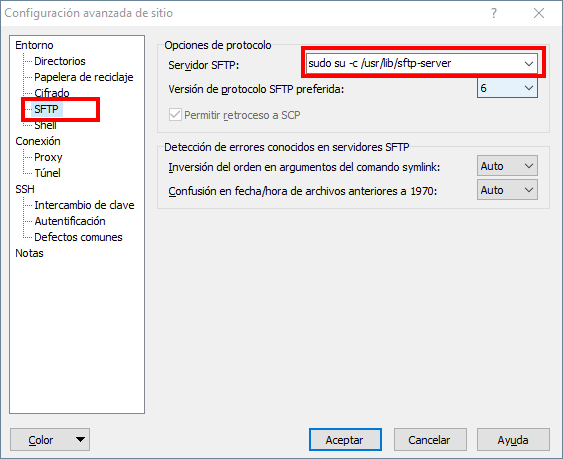
These are some of the many options available in this interesting software. Despite the large number of options and functionalities available, its use is intuitive and user-friendly.
In summary, a highly recommended application. WinSCP is completely free and available at https://winscp.net/. The code is available at https://github.com/Rupan/winscp.