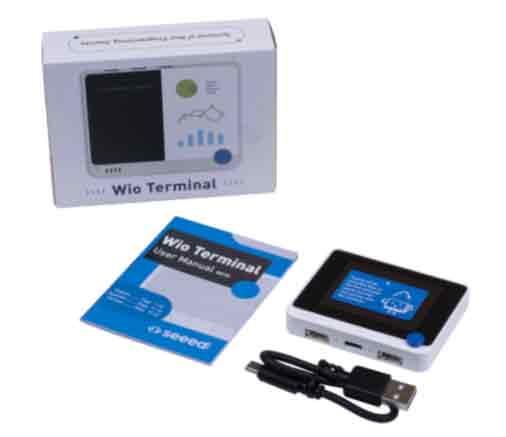
The Wio Terminal is an Open Hardware development board designed by Seeed Studio, a device that incorporates an LCD screen, WiFi and Bluetooth, making it an alternative to Arduino.
The Wio Terminal is designed to stand out for its ease of use and wireless connectivity, making it suitable for educational applications and IoT projects.
Inside this small device, we find the powerful Atmel SAMD51P19 ARM Cortex-M4F processor at 120Mhz, which we can overclock up to 200Mhz. The package is completed with 4MB of Flash memory and 192KB of RAM.
For wireless connectivity, the Wio Terminal relies on the well-known Realtek RTL8720DN, which provides Dual Band WiFi connectivity at 2.4Ghz and 5Ghz (802.11 a/b/g/n) and Bluetooth BLE 5.0.
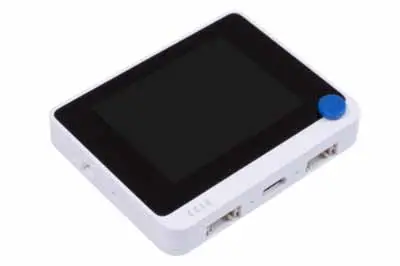
The body of the Wio Terminal is made of a white ABS casing, with a simple but pleasant design. Its dimensions are 72mm x 57mm x 12mm, so it fits perfectly in the palm of your hand.
The aesthetics of the device are dominated by the apparent 2.4” color LCD screen with 320x240 resolution controlled by an ILI9341 driver. The screen’s performance is adequate, although we notice a lack of uniformity in the backlight, something common in devices in this price and size range.
We also find three buttons on the top, a slider on the side used to control the boot mode, and a 4-direction joystick + button in the form of a small blue circle.
In general, the button response is correct, and their position is pleasant for use. Physically, the device gives an appearance of robustness and durability, something we don’t always find when testing devices of this size.
One of the strong points of the Wio Terminal is the large number of integrated devices it incorporates. These include an IMU (LIS3DHTR), microphone, speaker, light sensor, 940 nm infrared emitter, and a micro SD card reader.
Regarding connections, the device has a USB-C port on the bottom. Furthermore, the Wio Terminal includes USB Host and Client functions, and OTG support.
On the back, we find a 2x20 pin 2.54” connection port, which we can use to connect the device with the rest of the components in our project.
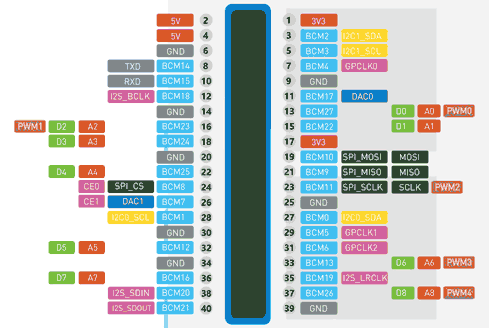
In theory, this 40-pin port is compatible with the Raspberry Pi GPIO port. In fact, it is designed to work together acting as a “Hat”, at least for Rpi versions 1 to 3.
However, we say “in theory” because, as often happens with Hats, being electrically compatible doesn’t mean physically compatible. In the sense that we might find the device “bumping” into some part (a heatsink, another peripheral, and let’s not even talk about any kind of case we put on the Rpi).
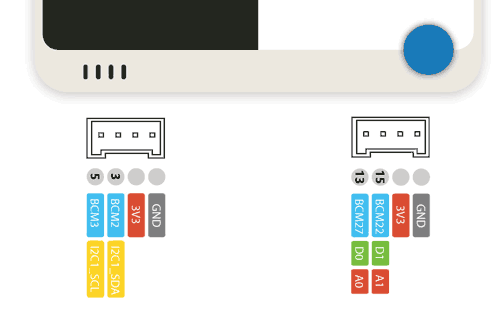
On the other hand, on the bottom we find two multifunctional Grove-type ports. We are already getting used to seeing this type of connection in other devices like the M5Stack, which seem to be becoming a trend in the field of educational processors.
However, in the end, the Grove system is just a standard connector designed to make connections easier. This means we can also use them as connection ports with any device, following the pinout below.
As for drawbacks, in its use we miss a battery, even a small one, which the device seems to be crying out for. While it’s true there is a HAT we can purchase for 9€, the manufacturer itself acknowledges it has some problems that will be resolved in future versions, without specifying when.
As we said at the beginning, Wio Terminal is Open Source and all the documentation can be found on the project’s website at Seeed Studio, where we can also purchase the device for a price of 29.90€ + shipping.
Testing the WIO Terminal
For programming, we have multiple options, the usual ones for a device that moves within the Arduino ecosystem.
These include ‘Wiring’ (C++), MicroPython, and ArdyPy (a Seeed Studio’s own development for programming in Python from the Arduino environment). All of this is quite well documented in the Project’s Getting Started Guide.
For example, to program the Wio Terminal as a “normal Arduino” from the Arduino IDE, we simply need to add the following URL to the board manager.
files.seeedstudio.com/arduino/package_seeeduino_boards_index.json
Next, we go to the board manager and add the “Seed SAMD Boards” family.
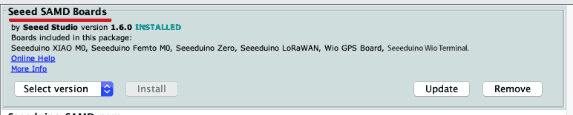
After installing the board definition, we can select it and start programming. For example, let’s make a simple example program to check that everything works correctly.
#include <TFT_eSPI.h>
#include <SPI.h>

TFT_eSPI tft = TFT_eSPI();

unsigned long drawTime = 0;

void setup(void) {
  Serial.begin(115200);
  tft.init();

  tft.begin();
  tft.setRotation(3);

  tft.fillScreen(TFT_BLACK);

  tft.setTextColor(TFT_WHITE);
  tft.setTextSize(2);
  tft.drawString("www.luisllamas.es", 50, 120);
  tft.setTextSize(1);
  tft.drawString("Hello from WIO terminal!", 50, 80);
}

void loop() {
}
This would be the result of this simple “hello world” program.
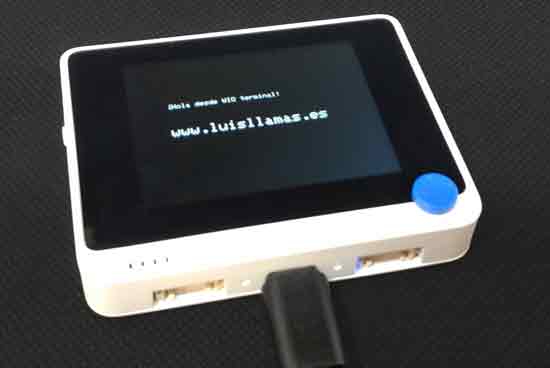
The board definition we added to the Arduino environment includes a wide repertoire of examples we can consult to test the Wio Terminal.
On the other hand, the documentation on the project’s page is surprisingly good, with plenty of examples about all the device’s functions. We even find a section where developers and users share developed projects, to serve as inspiration for others.
Conclusion
The truth is that the Wio Terminal is a real cutie that catches your eye as soon as you hold it in your hand. The feeling is very good, it gives the impression of being robust and well-made.
The SAMD51P19 provides great power and speed, while we have WiFi and Bluetooth connectivity, and a large number of integrated peripherals, all in a single compact device.
Regarding its usefulness, as usual… it depends on what use we consider it for. I certainly see it as a very suitable machine for education, or as a gift for someone who wants to learn.
For a little more than what an “original” Arduino costs, we have an infinitely more advanced and versatile device. A good example that, as you may have heard me comment sometimes, the “original” Arduino (or its price) is unrealistic today.
On the other hand, of course, the Wio Terminal cannot compete in price with an Arduino clone. Although we have already said an Arduino Atmega328P is not remotely comparable to this machine in terms of features.
To find something similar, probably, we find its natural rival in the ESP32 and developments based on it, like the M5Stack. In fact, we find parallels between both developments, although each has its own personality.
The price of the Wio Terminal is slightly higher, but in return it incorporates more devices and the overall feeling is of higher quality. But, again, we really miss an integrated battery (even a small one).
In any case, it is an interesting and very fun device to play with, and one more alternative to enrich the Arduino ecosystem.