

WizTree is free software for Windows that allows you to analyze and manage disk space on your computer.
With this program, you can easily see how much space your files and folders are taking up, identify the largest files, and delete those you no longer need to free up space on your hard drive.
WizTree scans the hard drive and displays the results in an easy-to-use tree view that allows us to easily detect which files and folders are taking up the most space on the system.
This type of software is very useful for keeping our computer clean. Other alternatives are TreeSize, which is paid, or the Open Source WinDirStar, which has a much uglier interface.
Another of WizTree’s strong points, compared to other similar programs, is its speed. Instead of a “conventional” analysis, WizTree uses the NTFS file system’s Master File Table (MFT) for a much faster scan.
How to Use WizTree
WizTree can be downloaded for free from the project’s website at https://diskanalyzer.com/. Once downloaded, install it on your system as usual.
The program adds an entry to the Windows context menu. Therefore, to analyze a folder, we simply need to right-click on it and choose “WizTree” to open the analysis.
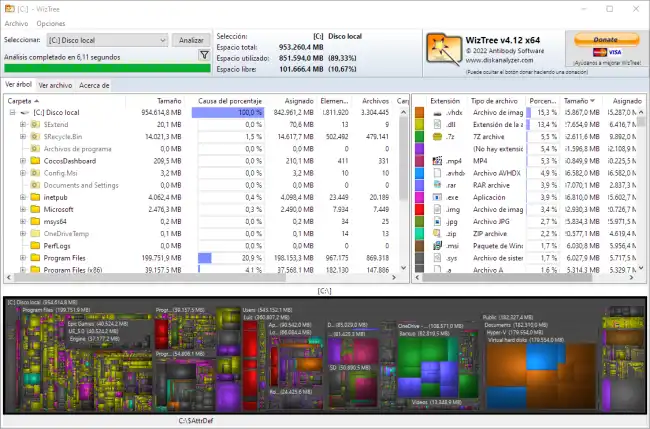
WizTree’s user interface is simple and without too many options. It features a tree that shows all folders and files, organized by size.
At the bottom, we can see a treemap diagram that can also help identify the items taking up the most space. Personally, I’ve never found it particularly useful.
Much more useful is the visualization of the number of files and size occupied by extension. For example, we can analyze the space taken up by images, videos, or music.
Also very, very useful is the ability to view all analyzed files, to see which ones take up the most space. Here we have the option to filter files, accepting wildcards, and being able to perform actions on all of them simultaneously.
Furthermore, in all these lists we can right-click on any file or folder to see the same options we would see in Windows Explorer.
In short, having a program to analyze folder sizes is, in my opinion, essential for performing maintenance and keeping our computer clean.
There are many alternatives, but WizTree is my favorite for its balance of features, aesthetics, and speed. It is free for personal use, although a paid version compatible with professional use is also available.
