
Zotero is a free and open-source reference management application for managing and organizing documents and facilitating the citation of research sources.
If you are someone who enjoys learning and is always trying to do so, you likely have a huge list of references and PDF files waiting to be read. From there, it’s difficult to know what you have read and what you haven’t, and to organize them by topic or tags. This is where Zotero can be a great help.
Zotero is one of the most popular tools among academics and students for managing their bibliographies and collaborating on research projects, due to its ease of use and the wide range of features it offers.
The Zotero interface is simple, clear, and quite easy to use. Although, personally, I also think it has room for improvement and could be updated a bit.
On the left, we have a tree of “virtual” folders (not physical ones), which we can create in a nested fashion to organize our documents.
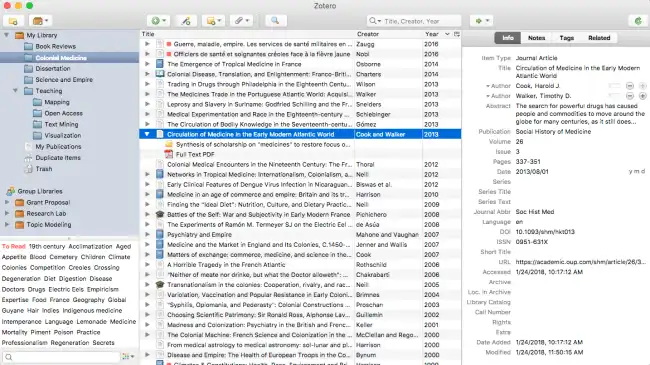
In our collections, we can add our documents. For each item we create, we can add one or several attachments. These attachments can be files physically located on our computer or URLs. Furthermore, we can add custom tags, notes, or link related items to each other.
It also features an integrated PDF reader, where we can add notes or highlight sections. This is very useful for recording the interesting parts of documents.
Another useful feature of Zotero is allowing you to maintain a document’s reference list and automatically generate citation documents. This is very interesting when creating content and properly attributing credit.
On the other hand, the program includes a synchronization tool that allows access to documents and notes from any internet-connected device. For this, we only need to create a free account. The synchronization result is, in general, quite good.
Furthermore, the application has a large community of users and a wealth of online resources that can help beginners get the most out of the tool.
We can also enhance its functionality through extensions. Some of the most useful ones are the following:
- https://github.com/windingwind/zotero-tag
- https://github.com/wshanks/Zutilo
- https://github.com/retorquere/zotero-folder-import
- https://github.com/jlegewie/zotfile
- https://github.com/retorquere/zotero-storage-scanner
- https://github.com/windingwind/zotero-better-notes
Zotero is a very interesting tool for managing our document library. It is free and available at https://www.zotero.org/
